Chronos · Develop & govern
Chronos: build fast, build clean, stay governed
Chronos is a harness that sits on top of the AI coding agents your developers already use. Shared skills, MCPs and prompts make every agent work faster and to the same standards; deterministic checks validate every change so spaghetti code never reaches the repository; and IT governs models, tools and access from one console — without credentials ever reaching the agent.
- Works with the agents you already use
- Deterministic checks on every change
- Secrets never reach the agent
- Up to 4× faster delivery
01 / Our platform
More than governance: a better harness for your coding agents
If your IT team already works with AI coding agents, nothing has to change. Chronos adds a layer on top — skills, MCPs, prompts and deterministic checks — that makes agents more efficient, normalises how they develop and governs how they are used.
-
Efficiency
A sharper harness
Curated skills, MCPs and prompts give every agent the context and tools it needs, so it gets to a good result in fewer steps.
-
Consistency
One way of developing
Every agent follows the same conventions, architecture and workflows, whichever model or developer is behind it.
-
Clean code
Deterministic validation
Rule-based checks validate every change the agent makes and stop spaghetti code before it reaches the repository.
-
Governance
100% governed
Protect code, credentials and sensitive data from a single panel that centralises users, models, MCPs and connections.
-
Cost
Around 30% lower token spend
Context enrichment, filtering of redundant metadata and log compression cut the tokens every task consumes.
-
Speed
Work in parallel
Run several agents at once, each isolated in its own environment, so they can take on different tasks without stepping on each other.
-
Automation
Super-Workflows
Super-Workflows and Skills automate repetitive tasks and run complex processes in one step.
-
No lock-in
Model independence
Always pick the best AI for the moment. Chronos adds a common layer on top of any agent, so you never get locked in.
-
Isolation
One sandbox per session
Each agent runs in a sandbox with controlled network egress, so AI use stays contained without exposing the rest of the system.
02 / Harness and standards
Every agent develops the same way — and every change is validated
Agents are only as good as the harness around them. Chronos packages your company’s way of building software as skills, MCPs and prompts, and backs it with deterministic checks, so what agents produce is fast, consistent and maintainable.
-
Your workflows, packaged
Repeatable ways of working — scaffolding, refactors, migrations, reviews — published once and used by every agent.
-
The right tools, already connected
Agents reach your repositories, tickets, docs and internal services through approved MCPs instead of improvising.
-
Company context in every session
Your conventions, architecture and definitions of done travel with every agent, so nobody has to explain them again.
| Step | What happens |
|---|---|
| The agent writes the change | Using your skills, MCPs and prompts |
| Deterministic checks run | The same rules, with the same verdict every time |
| A rule fails | The agent gets the exact violation and fixes it in the session |
| All rules pass | The change moves on to review and QA |
-
Deterministic
Validation that doesn’t guess
The code is checked by rules, not by another model’s opinion: the same change always gets the same verdict.
-
Maintainable
No spaghetti code
Changes that break your architecture, structure or conventions are caught and corrected before they land.
-
Normalised
Same standard for every team
Whatever the model, agent or developer, the output follows one standard that the console keeps up to date.
03 / Desktop app
Agents work on the developer’s machine — under your rules
A desktop app that runs locally, working on the developer’s own directories and with the git providers they already have configured.
-
Open a session per task
Every session works on its own branch and in its own isolated environment, so several agents can run side by side.
-
Ask for the change
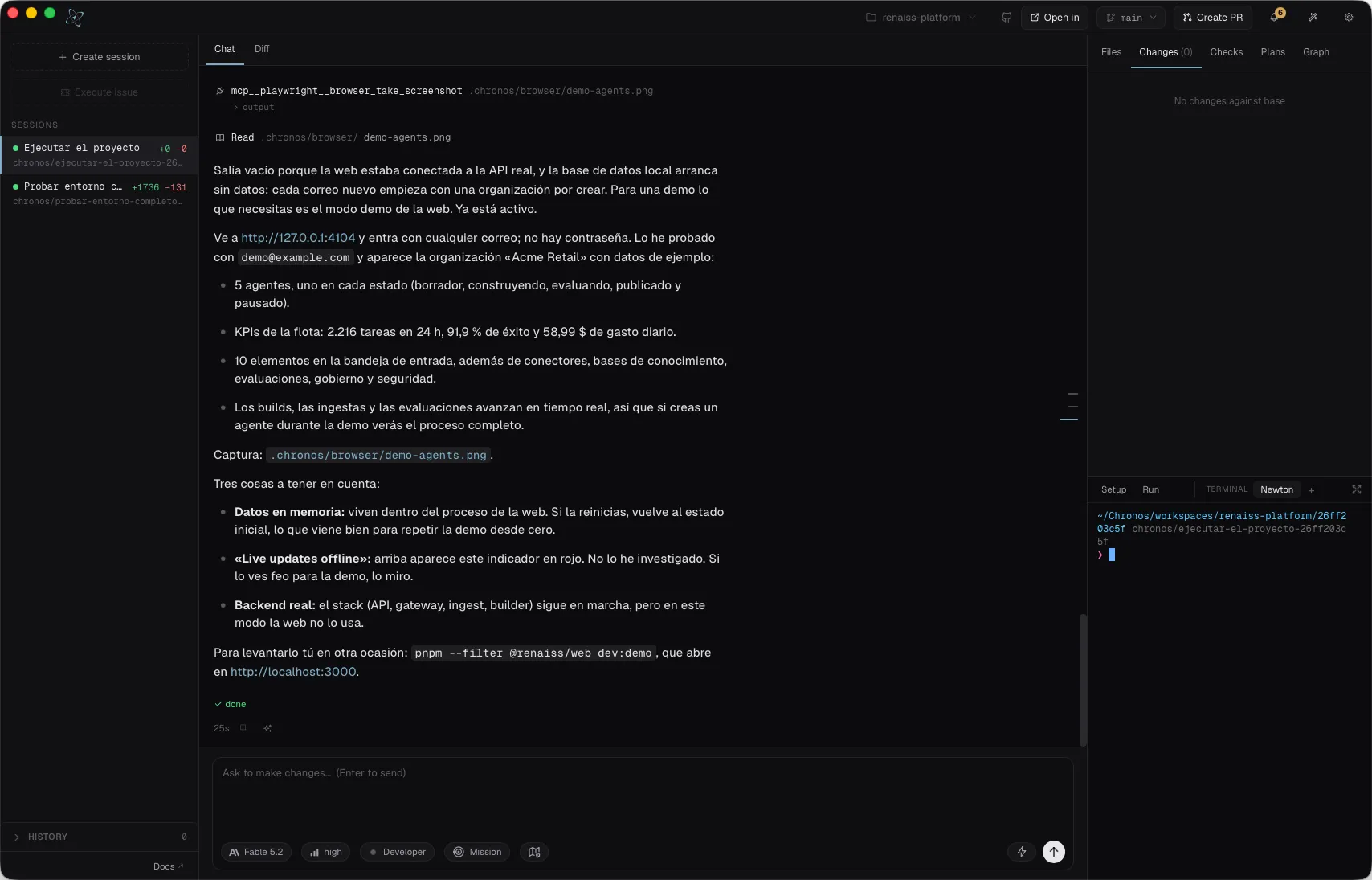
The agent edits files, runs commands and drives a real browser, with the chat, the diff, the files and a terminal in one window.
-
Review and open the pull request
Checks, plans and changes are visible before anything leaves the machine. The pull request goes to your usual git provider.
| Panel | What it shows |
|---|---|
| Sessions | Every task in parallel, with its branch and lines changed |
| Chat and diff | The conversation with the agent and the change it proposes |
| Files and changes | The repository tree and every modified file |
| Checks and plans | Test results and the plan the agent is following |
| Terminal | Setup, run and an interactive shell per session |
| Model | The model and reasoning effort allowed for the team |
04 / Governance and security
Data governance and security: the agent never sees a secret
The architecture fully decouples secrets from the agent and delegates all authentication to a secure, auditable broker. Organisations can connect their internal systems to AI while keeping control of access, compliance and the traceability of every interaction.
- AI agent · no credentials
- localhost only
- Secure broker
- Ephemeral token per call
- Any API, MCP or internal service
-
Authentication and permissions
The broker checks every call against role-based access control (RBAC).
-
Secrets from the system keychain
Keys are retrieved by the broker and injected per call as an ephemeral token. The agent only ever sees a local address.
-
Complete, append-only audit
Every action is recorded immutably, end to end.
| Category | Examples |
|---|---|
| Code | GitHub, GitLab, Bitbucket |
| Cloud | AWS, Azure, Google Cloud |
| Project management | Jira, Linear, Asana |
| Design | Figma, Sketch |
| Anything else | Any API or MCP — SaaS, internal or on-premise |
-
Zero secret exposure
Secrets never leave the broker
The agent never sees or touches credentials. They never appear in prompts, logs or commits.
-
Control and governance
Permissions per call
RBAC, policies and permissions are applied to every single call.
-
Full audit
Every action, immutable
Control of MCPs and Skills, end-to-end auditing and centralised access control.
05 / Control console
One console to administer and control coding agents
A single platform to control how coding agents are used across your company. A web console lets managers change permissions in real time; changes apply immediately to every user.
-
Total control
Decide what the AI can see, control how it runs and govern which tools, skills or MCPs your teams can use — always for maximum privacy.
-
Audited catalogue
Every tool, prompt and skill is signed by the console and verified at the start of each session. Every action is recorded immutably.
-
Credential security
The broker injects the company’s keys; the agent only sees a local address. Pin or revoke tokens from the console itself.
-
Capability filter
Turn whole modules on or off — Cloud, SEO, Agents, Cybersecurity, optimisers — cascading globally and per team.
-
Same AI, better result
Always pick the best AI for the moment. Chronos adds a common layer on top of any agent and avoids lock-in.
-
Integrate your systems
Connect tools such as Jira, GitHub or Azure DevOps to automate processes simply.
| Area | What managers do there |
|---|---|
| Catalog | Authorise MCPs with their endpoint, global or per-team scope, and set or revoke their token |
| Prompts and skills | Publish company prompts and review the skills proposed by teams |
| Connectors | Connect the company’s systems through the broker |
| Users, teams and roles | Decide who can use which model, tool and capability pack |
| Keys | Store and rotate the credentials the broker injects |
| Audit | Review every action recorded across sessions |
| Releases | Roll out new versions of the desktop app |
Signed and governed: every catalogue, prompt and skill is signed by the console and verified by the local daemon when a session starts.
06 / Memory and optimisation
Memory and context, designed from the latest agent research
Every decision in the architecture — from five-layer memory to token economy — comes from research into what makes a coding agent perform better.
-
Memory
Five-layer memory architecture
Company context, repository context, session memory, cross-session learning and retrieved knowledge. Knowledge is shared across teams.
-
Learning
Learning that passes review
Organisational knowledge grows with quality control, just like code. What one session learns can become a skill for the whole team.
-
Retrieval
Selective, real-time retrieval
Framework, repository and internal-tool documentation is consulted when needed, instead of dragging whole manuals into the context.
-
Tokens
Context economy
Conscious token spend: Chronos reuses what was already sent, filters redundant metadata and compresses logs to avoid unnecessary costs.
07 / Optimisation and power
Better results in less time
Instead of relying on a single AI assistant, Chronos orchestrates a team of specialised agents working in parallel sessions. Each one takes a part of the process — development, QA, documentation, security — to deliver faster and raise the quality of the output.
-
Development
Implements the feature.
-
QA and tests
Runs and validates.
-
Documentation
Updates docs and specs.
-
Security
Reviews secrets and dependencies.
-
Governed merge
A validated delivery.
-
Speed
Up to 4× faster project development
Faster project delivery
Parallel, specialised agents shorten the path from task to merge.
-
Capacity
+26% engineering capacity freed
Engineering time freed
Repetitive work moves to agents; engineers focus on review and design.
-
Spend
20–45% reduction in annual IT spend
Lower IT spend
Less token waste and less rework, measured over a year.
08 / Quality and testing
Automated QA, from code to CI/CD
Chronos automates QA across the whole cycle: while the code is being written and on every pull request in CI/CD. Agents test every change in real browsers and failures are fixed before they reach the pipeline.
-
QA in every agent session
While you code, in the app: the agent generates and maintains unit and end-to-end tests.
-
Every pull request validated before merge
The same tests run on every push or pull request, locally and in CI.
-
Cross-browser and mobile
Tests run in a real browser, on web and mobile.
| Outcome | What it means |
|---|---|
| Fixed in session | Before the push |
| Governed merge | Only if the tests pass |
| Blocked pull request | With the detail of the failure |
| Evidence | Screenshots, logs and traces |
| Continuous regression | Scheduled or on demand; configurable per repository and team |
Runs locally and inside your current CI/CD: GitHub Actions, GitLab CI, Azure DevOps, Bitbucket and Jenkins.
-
Before the push
Failures caught while you code
Problems are detected and fixed in the agent session, not in the pipeline.
-
No migrations
One more step in your pipeline
A step in the CI/CD you already use — nothing to replace.
-
Traceability
Every run recorded
Each execution is logged and auditable.
09 / FAQ
Chronos: questions, answered
What IT and Risk teams usually ask about Chronos.
What is Chronos?
Chronos is a harness that Renaiss builds on top of the AI coding agents developers already use. It is a set of skills, MCPs and prompts that makes agents more efficient and normalises how they develop, deterministic checks that validate every change to keep spaghetti code out, a desktop app where developers run several agents in parallel, each isolated in its own session, a web console where managers control which models, MCPs, skills and connections teams can use, and a secure broker that keeps every credential away from the agent.
Do we have to replace the coding agents we already use?
No. If your team already works with AI coding agents, nothing has to change. Chronos adds a common layer on top of any agent that optimises, controls and secures its use, so you can always choose the best model for the moment without lock-in.
Is Chronos only a governance tool?
No. Governance is one part. Chronos also improves the harness the agents work in — shared skills, MCPs and prompts that make them faster and consistent — and validates every change with deterministic checks, so the code they produce stays clean and maintainable.
How does Chronos stop agents from writing spaghetti code?
Every change the agent makes is validated by deterministic, rule-based checks against your architecture and conventions. The same change always gets the same verdict. When a rule fails, the agent receives the exact violation and fixes it in the session, before the code reaches the repository.
How does Chronos keep credentials away from the agent?
The agent only talks to a broker on localhost. The broker authenticates every call with role-based access control, retrieves the secret from the system keychain and passes an ephemeral token per call to the API, MCP or internal service. Secrets never appear in prompts, logs or commits, and every action is recorded in an append-only audit log.
How does Chronos reduce AI costs?
Chronos cuts token consumption by around 30% through context enrichment, filtering of redundant metadata and log compression. It reuses what was already sent and retrieves documentation selectively, instead of loading whole manuals into the context.
Where does Chronos run?
The Chronos desktop app runs locally on the developer’s machine, working on their own directories and with the git providers they already have configured. Managers use a web console to change permissions in real time, and changes apply immediately to every user in the company.
How does Chronos automate QA?
Agents generate and maintain unit and end-to-end tests during each session and run them in a real browser, on web and mobile. The same tests run on every pull request in your existing CI/CD — GitHub Actions, GitLab CI, Azure DevOps, Bitbucket or Jenkins — and a failing pull request is blocked with the detail of the failure and its evidence.
How is Chronos different from Khala and OverMind?
Khala builds and governs the AI agents an organisation puts into production, and OverMind continuously tests them. Chronos is the harness around the AI coding agents developers use every day to write software: it makes them faster and consistent, validates the code they write, and governs what they can access, which tools they can use and what each session costs.
10 / Next step
Next step: a better harness for your coding agents
Keep the agents and models your developers already use. Chronos adds the skills, MCPs, prompts, deterministic checks, console and broker on top.
-
Your setup
Tell us which coding agents, models and git providers your teams use today.
-
One team first
Developers keep their agents; managers set models, MCPs and skills from the console.
-
Measure
Compare delivery speed, token spend, code quality and audit coverage before and after.
11 / Get started
See Chronos on your own stack
Tell us which processes you want to turn into agents. We'll show you Khala, OverMind and Chronos running on your own stack.
- A walkthrough of Khala, OverMind and Chronos
- A review of one of your candidate cases
- Deployment options for your security requirements
12 / Security & compliance
Built for regulated companies
Information security and data protection are part of the platform, not an add-on. Your security and legal teams get the documentation they need to sign off.
-
ISO/IEC 27001
Information security management
An information security management system covering access control, encryption, incident response and supplier risk.
-
GDPR
EU General Data Protection Regulation
Personal data processed under a Data Processing Agreement, with data minimisation, EU data residency and support for data subject rights.
-
LOPDGDD
Spanish Data Protection Act
Compliant with Ley Orgánica 3/2018 de Protección de Datos Personales y garantía de los derechos digitales, which complements the GDPR in Spain.